Tuesday, June 22, 2010

SAP Portal - how to restore iview ('remove from page' problem)

how to clean up 'remove from page' problem

Problem : User remove iview "remove from page".

Solution :
1. Log into portal as admin.
2. Goto - System Administration - Support Desk - Portal Content Directory.
3. Click on Personalization cleanup.
4. Click on the radio button Principal.
5. Select the user login id.
6. Click Show.
7. Click into the "Logon ID"
8. Select the PCD URL on the users personalization
9. Click Remove.
Done

Graphical solution is below


* Remember if you want to disable the user from doing the removing part.
remember to set in property of the page and select no option
"remove iview" option.

Monday, June 14, 2010

SAP : Resetting ID and password

Log into your client with the power id ( normally with access to change password )
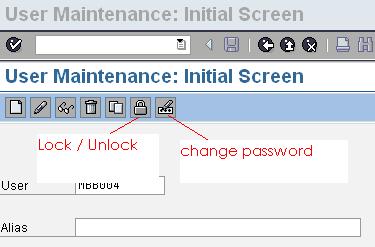
Transaction Code Su01.

Click on the change password icon as in the diagram.

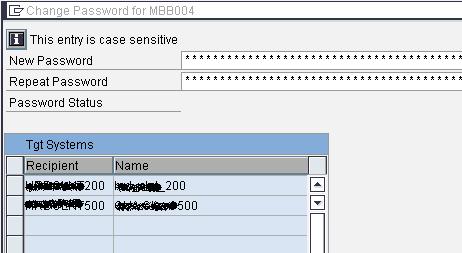
Then select the client where the id is located and reset as per request.
If you are getting the error on not authorized to use the su01 please do contact your admin or use a more powerful id.

Monday, May 24, 2010

System Trace st01, st05

The girl who i met 6 years ago. Huhu sweet one. Taught me this system trace to check the front end communicating with the backend R/3we can use this to detect which program it is talking to..

= ST01
= system trace
= http://saplab.org/2009/03/how-to-do-a-system-trace/

= use ST05 better
= http://anu-sapdiary.blogspot.com/2008/02/st05-performance-trace-overview.html
= remember to put ur userid as filter
= else, oth user tat access the web will be tracked
= i think u can choose RFC trace
= then click activate trace with filter
= filter with ur user id and put the program name if u know

Transaction Code POWL_QUERY

source
How i can define and configure POWL layouts for the users .

1.) requirement is like...Client wants me to configure 2 POWL layouts so that they can decide which one is ok and also let me know what is the use of report POWL_WLOAD also.

2.) Where i can see and maintain POWL queries and if i want to change any field then how i can do this.?

Explore SPRO path SRM => SRM Server => Cross application basic settings => POWL and advanced search

The use of the report POWL_WLOAD is to refresh the POWL active Queries in the system and to see the available POWL queries in the system execute the tcode POWL_QUERY.

we need to goto layout part and do config in UI Browser.

PS How to create POWL Application ?  

Thursday, May 20, 2010


http://hrmspdev.maybank.com.my:50000/irj/portal

Monday, May 17, 2010

How to delete variant

Deleting Variants

Procedure

Open the appropriate variant as described in Creating a Variant.
On the initial screen, choose Variants ® Delete.
The ABAP: Delete Variants dialog box appears.
Choose whether you want to delete the variant in all clients, or only in the current client.
Confirm your choice.


Result

The system displays an appropriate message in the status bar.


You can delete several variants at once from the variant catalog. Choose Delete variants, select the relevant variants in the selection dialog box, and choose Delete.
source = http://help.sap.com/saphelp_46c/helpdata/en/c0/980392e58611d194cc00a0c94260a5/content.htm

Tuesday, May 4, 2010

Changing appraisal header


Assignment was to control the validity of the calender header of the appraisal template
Badi notes :

Calender BADI : - HRHAP00_DOC_DEF_DV

tcode :-
se19 (BADI)

Cluster Table :- VC_T77HAP_CATEGORY (enter the Badi into this table first then OOAM)

tcode : sm34 to access the table

tcode :- OOAM (Enter into the template under "Layout")